.png)
Last Updated: October 11, 2026
A fall detection smartphone uses built-in sensors to recognize a sudden fall and automatically alert emergency contacts or services, a critical safety feature for adults 55 and older who want to maintain independence.
Fall detection combines hardware and software: your phone's accelerometer and gyroscope detect the characteristic motion pattern of a fall, rapid downward acceleration followed by a sudden stop.
Your phone's accelerometer measures acceleration in three dimensions while the gyroscope tracks rotation. When you fall, these sensors detect rapid downward acceleration followed by a sudden stop. The software analyzes this pattern in real time and either prompts you to confirm the alert or automatically notifies emergency contacts.
Smartphones process sensor data locally, so fall detection works without internet, though location sharing and alerts require cellular or Wi-Fi connectivity.
Falls are a significant concern for older adults (the CDC). According to CDC data on falls among older adults, many seniors experience falls that result in serious injuries, yet many don't seek immediate help.
A fall detection smartphone requires no separate device or bracelet. Your phone is already with you, and automatic alerts eliminate the need to physically reach a phone or press a button while injured.
If you use an iPhone paired with an Apple Watch, enabling fall detection is straightforward.
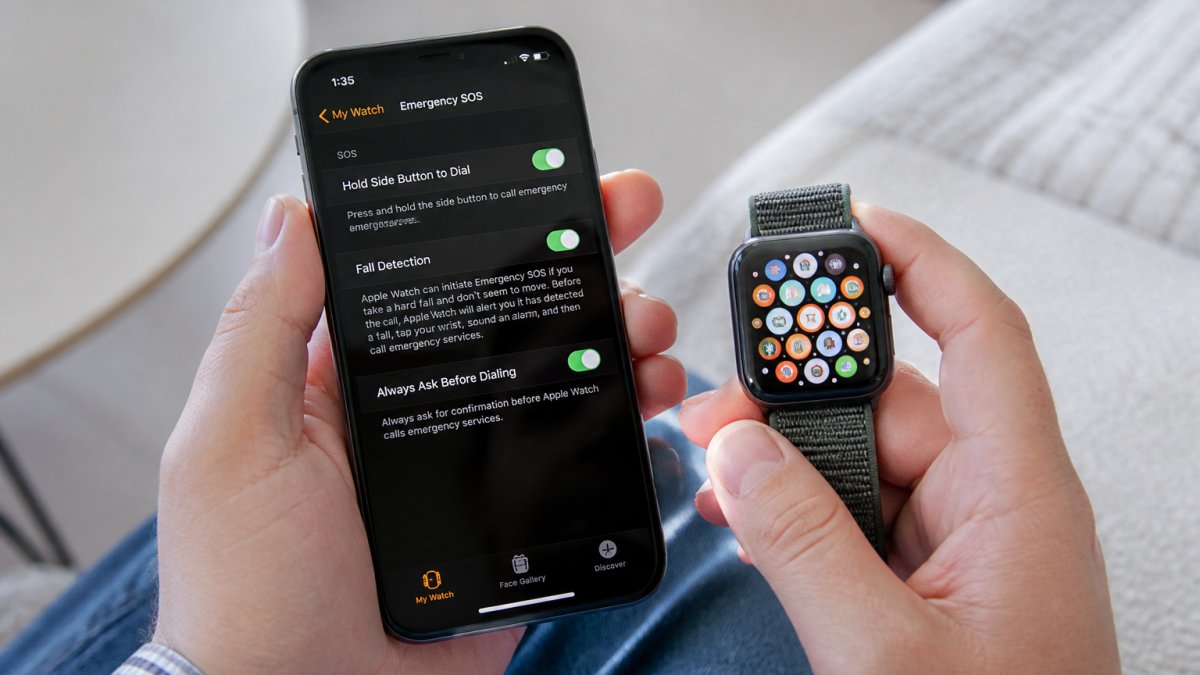
To set up fall detection on your Apple Watch, open the Watch app on your iPhone, tap "My Watch," navigate to "Emergency SOS," and toggle "Fall Detection" on.
Your Apple Watch will monitor for falls continuously. When detected, it vibrates, sounds an alert, and displays a prompt. If you don't respond within 60 seconds, it automatically calls emergency services and sends your location to emergency contacts.
In the Health app on your iPhone, go to "Medical ID" and tap "Edit" to add family members or trusted friends as emergency contacts with their phone numbers.
Set a primary emergency contact in the Watch app who will receive notifications with your location. Ensure they understand the alert system and know how to respond.
Android devices lack native fall detection, so you'll need to download a dedicated app from the Google Play Store. Several options are available with varying features and alert mechanisms.
When selecting an Android fall detection app, review how it detects falls and what happens when one is detected. Read user reviews for real-world performance and check whether it works standalone or integrates with wearables or medical alert services.
Download your chosen app from the Google Play Store. During installation, grant permission to access your phone's sensors and contacts.
After installation, grant the app permission to access your accelerometer, gyroscope, location services, and contacts so it can detect falls and notify family members.
Configure emergency contacts within the app, specifying the order they'll be notified. Some apps require a PIN to prevent accidental alerts. Follow the setup wizard and test the alert system to ensure notifications work.
Dedicated fall alert devices, worn as bracelets, pendants, or clips, detect falls and automatically notify family members and emergency services.
When a wearable detects a fall, it sends an alert to a monitoring center or emergency contacts. Many include two-way voice communication so the center can assess the situation before dispatching services.
The device transmits your location via GPS, cellular, or Wi-Fi. Family members receive notifications showing your location on a map, removing uncertainty about where you are and what help you need.
When setting up a fall alert device, add family members as emergency contacts. Most systems let you customize notification order, for example, spouse first, then adult children, then emergency services.
Test the alert system with family members before relying on it. Have them confirm they receive notifications and understand how to respond.
Comprehensive medical alert systems combine smartphone technology, wearable devices, and professional monitoring. SafeWell55 integrates fall detection with 24/7 virtual care, emergency response, and family notification into a single membership.
An integrated system uses multiple detection methods: your smartphone monitors for falls when you have it, while a wearable provides protection when you're away from your phone. Both communicate with a central monitoring service that coordinates emergency response.
When a fall is detected, the system immediately alerts emergency contacts and connects you with a live representative who can assess your condition and dispatch appropriate help.
SafeWell55 members can activate emergency alerts with a single tap on their smartphone. The app connects directly to emergency services and shares your location automatically.
The system works whether you initiated the alert manually or the fall was detected automatically. Either way, emergency contacts receive your location, your medical information, and real-time updates about response efforts.
Before relying on fall detection, verify that alerts work by testing notifications and location sharing with your emergency contacts.
Most fall detection apps and devices include a test mode. Send a test alert to emergency contacts and confirm they receive the notification and understand what it means.
Test your smartphone app in different locations, at home, in your car, while walking, and at different times of day to identify connectivity issues and ensure consistent performance.
Test location-sharing by sending a test alert and having family members verify the location on a map is accurate within a few meters.
GPS accuracy varies indoors versus outdoors. Test location sharing in places you frequent, home, shopping areas, walking routes, to understand where the system is most reliable.
| Testing Element | What to Check | Expected Result |
|---|---|---|
| Alert notification | Family receives notification on smartphone | Notification arrives within 10-15 seconds |
| Location accuracy | GPS coordinates match your actual location | Location accurate within 10-20 meters outdoors |
| Contact response | Emergency contacts can confirm receipt | All contacts confirm they received the alert |
| Multiple locations | Test alerts from different places | System works consistently everywhere you go |
| Connectivity | Test with Wi-Fi and cellular | Alerts send on both connection types |
Fall detection technology is valuable, but it has real limitations. Understanding these helps you set realistic expectations and use the system effectively.
Fall detection systems analyze motion patterns. Slow collapses or falls while already sitting or lying down may not trigger alerts because the system detects changes from standing to the ground.
Jumping, sitting quickly, or exercising vigorously might trigger false alerts, while some actual falls may not be detected. Fall detection should complement other safety measures, not replace them.
To reduce false alarms, ensure your device is properly calibrated and adjust sensitivity settings in most apps. Lower sensitivity reduces false alarms but increases the risk of missing actual falls.
Wear or carry your device consistently and close to your body so sensors accurately capture movement patterns.
Using fall detection means granting your smartphone or app access to sensitive information, your location, motion data, and emergency contacts. Understanding what data is collected and who can access it helps you make informed decisions about your privacy.
Fall detection requires access to your phone's motion sensors and, in most cases, your GPS location.
Some fall detection apps collect additional data, your movement patterns, the times you're most active, where you spend your time. Review the app's privacy policy to understand exactly what data is collected and how it's used.
You have control over which family members receive emergency alerts and location information.
Most systems allow you to adjust privacy settings. Some apps let you share location only during emergencies, not continuously.
Your emergency information is protected, and you control exactly which family members can access it.
Setting up fall detection on your smartphone is a practical step toward maintaining independence while ensuring help is available when you need it.
The most effective safety approach combines fall detection technology with home modifications, regular check-ins with family, and a comprehensive wellness program that addresses your broader health and safety needs. SafeWell55 brings these elements together into one integrated membership, pairing fall detection and emergency alerts with 24/7 virtual care, prescription savings, and digital security tools designed specifically for adults 55 and older. Learn more about SafeWell55 and discover how to build a complete safety net that lets you live confidently and independently.
Setup varies by device. On iPhone with an Apple Watch, open the Watch app, tap My Watch, then Emergency SOS, and toggle Fall Detection on. For Android, download a fall detection app from the Google Play Store, install it, grant sensor permissions, and configure emergency contacts. Each method requires you to specify family members or emergency contacts who will receive alerts if a fall is detected.
Yes. Many smartphones have built-in accelerometers and gyroscopes that can detect sudden movement and impact. Android devices can use dedicated fall detection apps that rely on these sensors alone. iPhone users benefit from fall detection on the device itself, though an Apple Watch provides more reliable detection. Smartphone-only detection works best when your phone is in a pocket or held during the fall.
An Android fall detection app uses your phone's motion sensors to recognize falls and alert family or emergency services. When choosing an app, check that it offers automatic alerts, manual call options, GPS location sharing, and integration with emergency contacts. Read reviews to verify reliability and ensure the app works offline or with cellular and Wi-Fi connections.
When setting up fall detection, you'll add emergency contacts during the initial configuration. Most systems let you specify multiple family members or caregivers who receive notifications when a fall is detected. You can usually choose how they're notified (text, call, app alert) and set a delay period that allows you to cancel the alert manually if it was a false alarm. Test the notification system to confirm all contacts receive alerts properly.
Smartphone fall detection can miss falls if your phone isn't with you or is damaged in the fall. False alarms can occur during sudden movements like jumping or sitting down quickly. Detection accuracy depends on sensor quality and your phone's position. Additionally, the system requires battery power, an active phone plan or Wi-Fi connection for alerts, and proper emergency contact setup. Wearable devices like smartwatches typically offer more reliable detection because they stay closer to your body.